View, understand and pay your Swisscom bill
Keep track of your Swisscom bill at any time: Log in to My Swisscom to view your bills. Find out what individual amounts mean, how your bills are delivered, how you can pay them and how to request an extension or pay in instalments.
View your bill online
Your outstanding, paid and due bills at a glance.
Would you still like to receive your monthly bill by e-mail as a PDF (free of charge)? You can change how your bill is delivered in My Swisscom.
Understand bill amounts
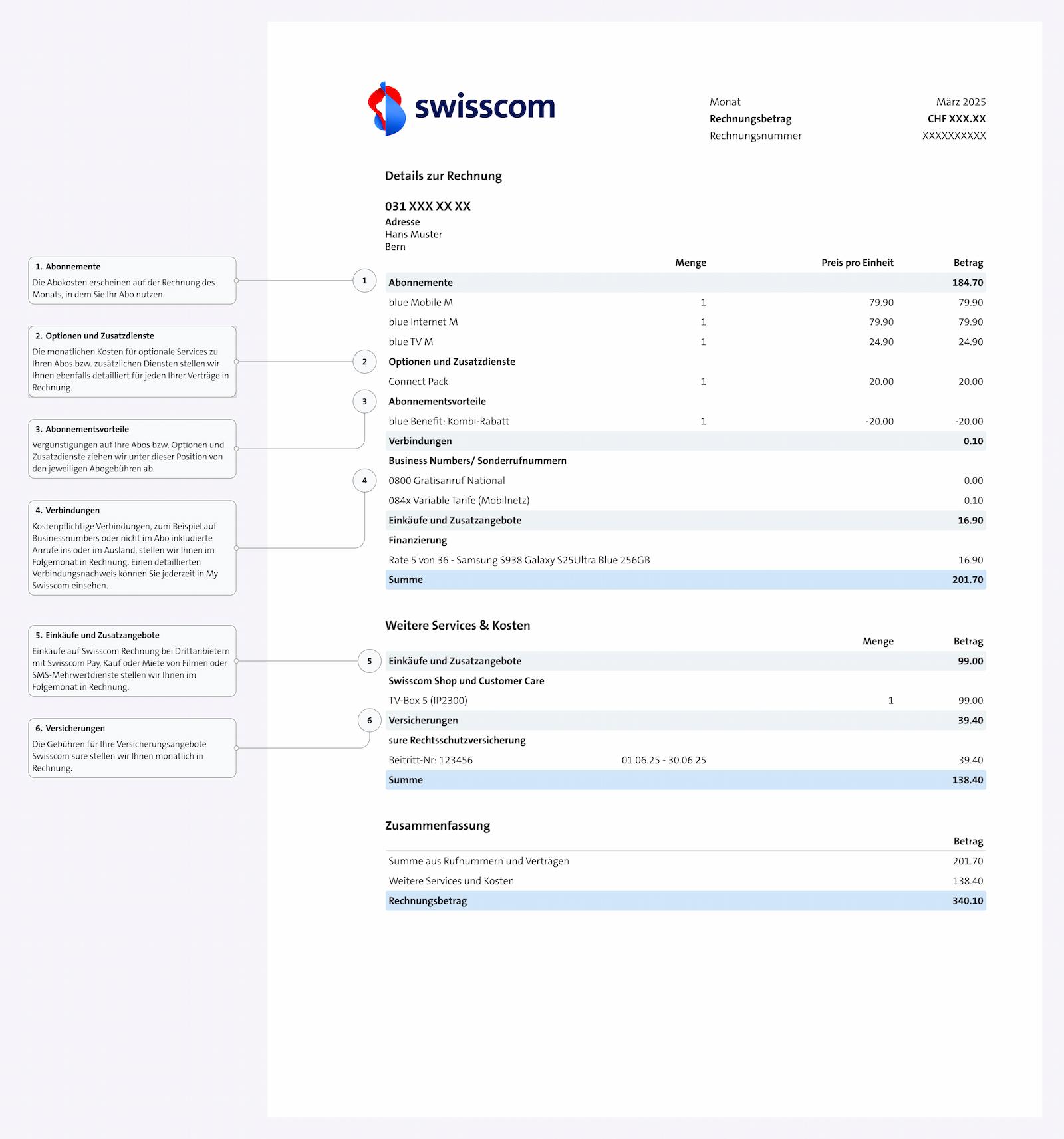
Find out what the items and amounts on your Swisscom bill mean and what is meant by the billing details.
Bill items
- Subscriptions: In this section, you can see all active subscriptions (e.g. your mobile, internet or TV subscription). The subscription costs appear in the month in which you use the subscription.
- Options and additional services: This category lists all additional options booked for your subscriptions, such as a data package or a roaming option. The costs are itemised for each contract..
- Subscription benefits: What does a negative amount on my bill mean? This is not an error: under 'Subscription benefits', discounts and special offers that reduce your bill amount are listed, e.g. a combined subscription discount.
- Connections: Under 'Connections', you can find all chargeable connections that are not included in your subscription, e.g. calls to special numbers or abroad.
- Purchases: Do you see an instalment amount on your bill? This section lists device financing, purchases from the Swisscom Shop and third-party services charged via your mobile phone bill.
- Insurance: Under 'Insurance', you can find all insurance premiums billed monthly through Swisscom, e.g. for device insurance or legal expenses insurance.
You can also find the details directly on your bill from page 3 onwards (see example). If you receive a paper bill, tick the box "Bill details" under My Swisscom > Delivery settings(opens in new tab) to display the details.
Why is my Swisscom bill higher than last month?
If your Swisscom bill is higher than usual, there may be various reasons: an expired promotion or credit, a subscription change, outstanding amounts from the previous month, additional charges, as well as costs for international calls, roaming or value-added services.
Why are there additional charges on my bill?
Additional charges may apply if, for example, bills have not been paid by the due date. These include reminder fees and fees for unblocking a connection, as well as charges for payments made at a post office counter or in a Swisscom Shop. Copies of bills may also incur a charge.
Why is my bill higher after changing my subscription?
If you change your subscription before the end of the month, the costs for your previous and new subscriptions will be charged on a pro rata basis. In addition, your bill may be higher if a promotion or regular credit has expired and the standard price applies (see also 'Why is my Swisscom bill higher than last month?').
How do international calls and roaming affect my bill?
Calls abroad and using your mobile phone abroad may incur additional charges. Depending on your subscription, international calls, roaming calls, SMS messages or data usage abroad may not be included and will be charged separately.
Why are purchases or third-party services listed on my bill?
Purchases from third-party providers that you pay for via Swisscom Pay or by premium SMS are billed directly through your Swisscom bill. Digital content, such as purchased or rented films, also appears on the bill for the respective month.
Why is my first Swisscom bill higher than expected?
The first bill may include activation costs or hardware purchased in addition to the subscription costs. As a result, it is often higher than subsequent monthly bills.
Why do I receive another bill after cancelling my subscription?
After cancelling a subscription, you will generally receive a final bill. This covers all services used up to deactivation, for example pro rata subscription fees, connections, roaming charges or purchases that have not yet been billed.
The standard notice period for cancellation is 60 days, effective at the end of the respective month. If this notice period is not observed, additional charges may apply.
Questions about your bill?
Ask Sam and find out what the amounts on your Swisscom bill mean.
Pay your bill and change payment method
Is your Swisscom bill higher than usual, or do the amounts seem incorrect? Your Swisscom bill may differ from the usual amount for the following reasons:
Pay automatically
eBill (recommended)
The bill appears directly in the eBill portal in your e-banking. You can check it and approve it for payment in just a few clicks, or pay it automatically using the permanent approval option.
Set up eBill(opens in new tab)
My bank does not offer eBill. Can I still set up Swisscom eBill?
If your bank does not currently support eBill, unfortunately you cannot pay your Swisscom bills with eBill. Please choose another payment method.
How do I deactivate eBill??
Change the bill delivery settings under 'Bills' > 'Settings' in My Swisscom. Alternatively, you can remove Swisscom from the list of billers in the 'eBill' settings in your online banking.
PostFinance direct debit (Direct Debit)
Authorise PostFinance to pay bills automatically every time.
Bank direct debit (LSV)
With bank direct debit (LSV), you authorise your bank to pay Swisscom bills automatically every time.
The Swiss financial centre will discontinue bank direct debit (LSV) as of 30 September 2028.(opens in new tab) As a result, some billers no longer offer LSV. Swisscom will only accept new LSV registrations until the end of 2026. Please change your payment method in good time – we recommend eBill or PostFinance direct debit.
Pay online now
E-Banking
As soon as a new bill is available, you can pay it as usual via your e-banking. It's even easier with the 'Pay with banking app' function in the My Swisscom app.
Visa, Mastercard oder TWINT
Pay outstanding bills quickly and easily online in My Swisscom.
Pay in person
Swisscom Shop or post office (subject to a fee)
Pay your bill in person at a Swisscom Shop or a post office. Please note the additional charges: CHF 6.90 per bill at a Swisscom Shop and CHF 3.90 per bill at a post office.
Payment difficulties: extension and payment in instalments
If available, you can extend the payment deadline for an outstanding or due bill. In addition, if available, you can pay the bill in instalments if the total outstanding amount is CHF 100.– or more. You can see which option is available to you in My Swisscom.
Request an extension of the payment deadline or pay in instalments (opens in new tab)
Outstanding bills and unblocking services
If you do not pay your Swisscom bill by the due date despite receiving a payment reminder, we will suspend your Swisscom services. A charge of CHF 60.– applies each time your services are unblocked. Follow these steps to unblock your services:
- Log in to My Swisscom: Log in to My Swisscom and select 'Bills' in the overview.
- Pay your bills: The quickest payment methods are Instant Payment, Visa, Mastercard or TWINT.
- Use your services again: Your services will be unblocked within 2 hours of receiving your payment. If your mobile phone does not connect, switch it off briefly and then switch it back on.
FAQ
What are the account details (IBAN and billing address)?
IBAN: CH81 0900 0000 8769 3077 7
SWIFT/BIC: POFICHBEXXX
payee: Swisscom (Schweiz) AG
Alte Tiefenaustrasse 6 CH-3050 Bern
Important: Enter the invoice number or your phone number as the payment reference.
How do I stop receiving paper bills?
Log in to My Swisscom. Go to 'Bills' and, under 'Settings' > 'Bill delivery', select how you would like to receive your bill.
How can someone else view and pay my bill?
Log in to My Swisscom. Go to 'My profile'. Under 'Manage permissions', enter who should have access to your bill. The person you have entered will receive an e-mail asking them to accept the permission by clicking on the link. You decide whether the person you have entered can view only your bill or also your itemised usage record.
Why don't I receive my bill as a PDF by e-mail?
For security reasons, Swisscom does not attach bills as PDFs to e-mails sent to unverified e-mail addresses. Would you still like to receive your bill as a PDF by e-mail? Verify your e-mail address in My Swisscom (under Profile > Payment settings) and change the delivery method.
I've lost my bill. What can I do?
You can access your bills My Swisscom(opens in new tab) at any time.
Choose your support option
Manage in My Swisscom
View invoices, pay or change settings: Directly in your account.
Arrange a callback
Get support from a specialist on the phone.
Have your invoice ready for this.

Möchten Sie etwas bestellen? Wir beraten Sie