Cybercriminals regularly attack company websites and steal customer data, among other things. It is therefore possible for your e-mail addresses, logins, passwords, etc. to be suddenly exposed online. There is then a danger that someone could misuse this data and, for example, log in to your e-banking account or make purchases in online shops using your credit card.
Free with every Internet and mobile subscription
Surf and call securely: Internet Guard, protection against phishing SMS, spoofing detection and number blocking are included for free with all plans.
Straightforward. Secure. Worry-free.
The alarm system for your data
Identity Monitor
Alerts you immediately if your data falls into the hands of cybercriminals.
- Immediate warning in the event of suspicious activity
- 24/7 protection through Swisscom and F-Secure
- Clear instructions in the event of data theft
- Free with a Mobile or Internet subscription
Simply store your e-mail address and we will monitor it for you, 24 hours a day.
0.–/mth
Callfilter
Protection from unwanted calls
The free Callfilter protects you from unwanted calls and aggressive telemarketing. In addition, you can manually block or unblock up to 200 individual numbers.
SMS-Filter
Protection from fraudulent SMS
The SMS Filter provides the best possible protection for all Swisscom customers (incl. Migros Mobile, Wingo and Coop Mobile) with a Mobile plan or prepaid offer against malicious and fraudulent SMS.
SMS phishing (smishing) involves sending text messages with fraudulent links that supposedly come from a reputable company.
Internet Guard
Protection from dangerous websites
The Internet Guard warns you about websites that, by assuming a false identity, try to gain access to your online accounts in order to cause you financial harm or misuse your data.


Security Dashboard
Your digital protection – in view at all times
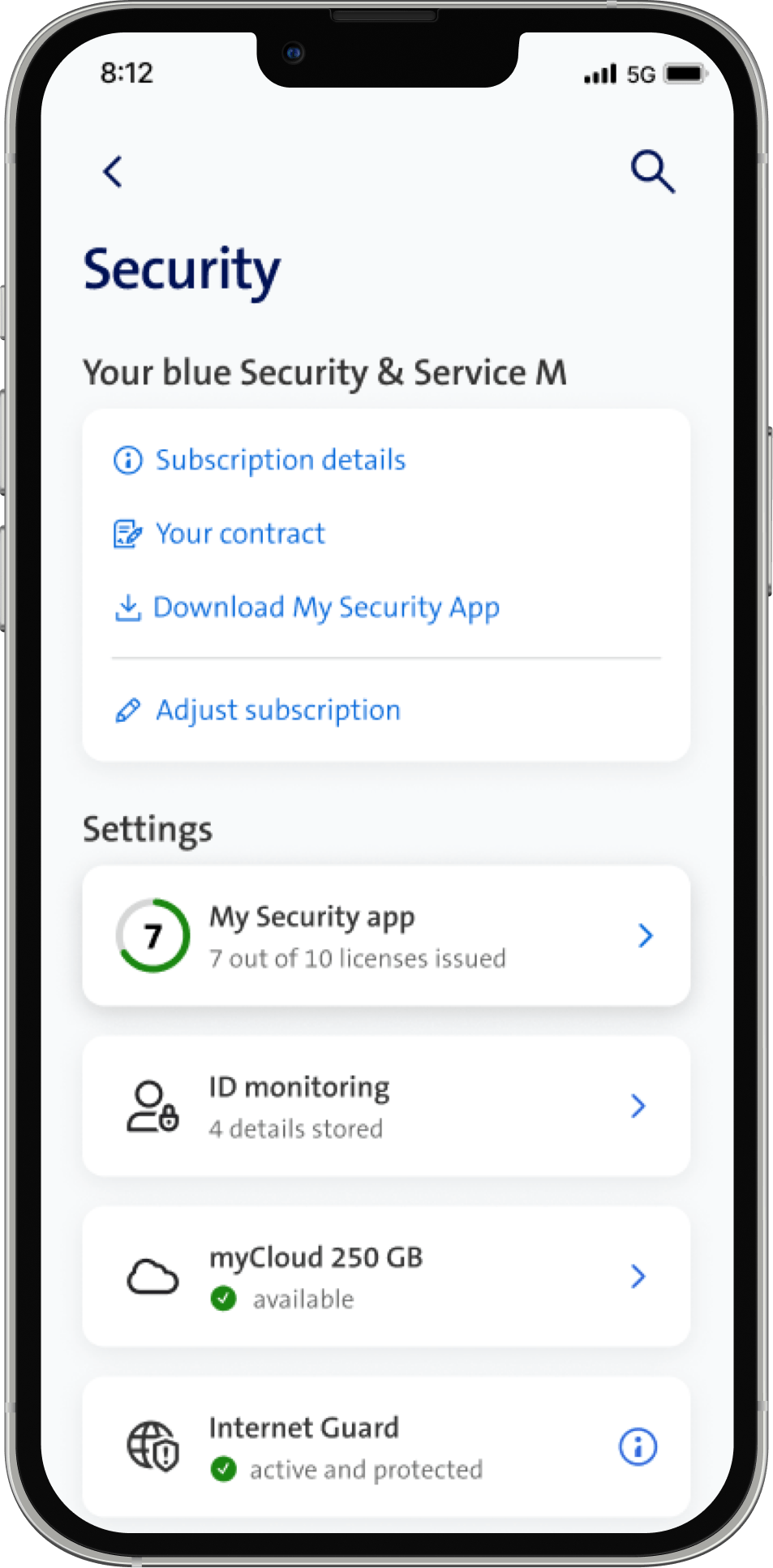
The Security Dashboard provides you with everything you need for your digital protection in one place. Keep an eye on your home network protection, manage your active security products and discover free security services. So you always know how well protected you are - simply and transparently.
SMS-Filter: Frequently asked questions
Learn more about phishing
Phishing are fraudulent messages that attempt to elicit personal data such as passwords or credit card details. The scammers pose as a well-known company or brand by sending a fake Swisscom bill (example(opens in new tab)) or tempting offer for example.
How to avoid spam & phishing
How to protect yourself:
What we are doing:
- Free spam filter for Bluewin e-mail
- Free Callfilter for landlines and mobile phones
- Internet Guard, included in your Internet subscription, warns you about dangerous websites.
Callfilter: Frequently asked questions
How reliable is the Callfilter?
The Swisscom Callfilter blocks undesired telemarketing calls according to up-to-date blocking lists. The blocking list is compiled to the best of our knowledge. However, it is still possible that some undesired telemarketing calls will get through. In exceptional circumstances it is also possible that some normal calls may be blocked.
How does the Callfilter work?
Callfilter spares you the hassle of unsolicited cold calls. It automatically blocks incoming calls from numbers on a list that is continually updated using specific criteria. This service is for free.
The following numbers are usually blocked:
- Callers who do not respect the requisite level of transparency (purpose of call, company name, phone number, etc. not displayed)
- Callers who ignore the asterisk system in directories
- Callers who call at inappropriate hours (before 8 am or after 8:30 pm on weekdays, before 9 am or after 4 pm on Saturdays, or on Sundays and public holidays).
- Callers who call a customer more than once within a day
- Aggressive marketing calls (e.g. dubious sales tactics)
- Calls from numbers with an invalid format
- Numbers that many Swisscom customers have placed on their individual blacklists
- Numbers that many customers have designated as unwanted
The Callfilter does not usually block the following numbers:
- Calls that adhere to the code of conduct of the industry association for call centres (CallNet.ch), including respect for the asterisk system and no calls at inappropriate hours.
- Calls from serious survey institutes which adhere to industry standards and are not advertising calls
- Calls from official bodies such as the Federal Statistical Office
- Calls from firms which contact their customers using different numbers than those used for advertising calls
The Swisscom Callfilter blocks undesired telemarketing calls according to up-to-date blocking lists. The blocking list is compiled to the best of our knowledge. However, it is still possible that some undesired telemarketing calls will get through. In exceptional circumstances it is also possible that some normal calls may be blocked.
How can I protect myself from fraudulent calls?
What should you do if you receive a fraudulent call?
- Always be suspicious when asked for sensitive data, even if the caller says they need this information for identification purposes.
- Tell the caller that you will call them back. However, do not use your phone's redial function. Instead, dial the official number of the company the caller claims to represent and ask if they just tried to contact you.
- Hang up if you feel pressured by the caller. This isn't rude; it's for your own protection.
What does the spam suspicion notice on my smartphone mean?
Starting in May 2026, the Callfilter will display a “Caution: Spam Suspicion” notice on the screen for calls identified as potential spam. This allows customers to immediately see whether a call is suspicious before answering it. The notice appears on the smartphone screen (regardless of the model) as well as on landline phones that support this type of display.
Where can I report fraudulent calls?
Internet Guard: Frequently asked questions
How do I check whether Internet Guard is active?
Swisscom has specially created a website(opens in new tab) on which you can check whether Internet Guard is active. To run the test, you need to use a network protected by Internet Guard. Make sure that you access the Internet via your Swisscom Internet connection at home or use the Internet at your workplace. Internet Guard will warn you if you perform the test in the Swisscom network, otherwise an info page is displayed.
How do I report a safe or dangerous website?
If you are warned about a website that you believe to be safe, please use the following link to let us know.
Conversely, if you wish to report a website that you believe to be fraudulent (e.g. phishing or scams), a website containing malware (viruses, Trojans etc.) or a website that exploits device vulnerabilities, please e-mail us directly at spamreport@bluewin.ch.
In which cases does Internet Guard not issue a warning?
In the following cases, Internet Guard may not warn you of a dangerous website.
- You are not surfing on the Swisscom network.
- You have knowingly or unknowingly configured your device or home network router with a DNS (domain name server) different to Swisscom.
- Internet Guard is not yet aware of a new dangerous website.
Identity Monitor: Frequently asked questions
How do I activate the Identity Monitor?
Simply enter your e-mail address in My Swisscom (under Security) and confirm - the free protection is activated immediately.
What does the Identity Monitor cost?
The product is available free of charge for all Swisscom customers.
How is the integration done?
Ordering and integration take place via My Swisscom. No installation is required.
How is the customer informed in the event of a data breach?
The customer receives an e-mail notification with clear recommendations for action .
Conditions
Here you will find the terms of use.
Security Dashboard: Frequently asked questions
What is the Security Dashboard?
The Security Dashboard is a central component of My Swisscom in the area of security. It provides an overview of all security products and allows direct access to the settings of the My Security app or Identity Monitor.
What functions does the dashboard offer?
It shows real-time messages about possible data leaks, instructions in the event of security incidents, an overview of your own subscription (blue Security & Service S/M/L), as well as the current security status with active protection functions such as Call Filter, SMS Filter, Internet Guard and myCloud.
How can I use the dashboard?
The dashboard is free of charge and accessible via My Swisscom.
Complete peace of mind online
Surf with confidence – at home or on the move. With our support, your devices are always optimally protected.
More control
Manage data
Manage data
Your e-mail addresses and credit card details are stored on many websites. If there is a security breach and your data is at risk, we will inform you immediately. We help you to protect your information and stay in control at all times.
More protection
Protect privacy
Protect privacy
A unique and strong password for every account - without having to memorise them all. Our password manager makes this possible. We also use an encrypted VPN to ensure that your private data is also protected in public WLANs - e.g. in cafés or hotels.
More confidence
Feel secure
Feel secure
Our automatic fraud detection automatically blocks dangerous websites. The virus and spam filters are also always active. In addition, you can set up parental controls for all devices in the household to let your children surf without worries.




