Set up and use

Installation manuals
Internet & WLAN
Managing
Data traffic
Security
Network
Get to know the device
Buttons and connections
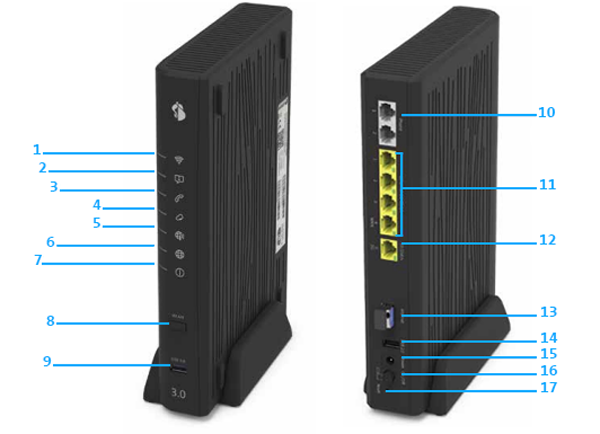
- WLAN
- Service
- Telephony
- Internet Backup
- Mobile Internet
- Internet
- Power
- WLAN (WPS)
- USB 3.0
- Analogue telephone ports
- 1 Gbit/s Ethernet
- 10 Gbit/s Ethernet
- Internet
- USB 2.0
- Power supply connection
- On/Off (Power)
- Reset
Overviews (PDF)
Frequently asked questions
What do the LEDs on my Centro Business mean?
Red, white, blue or green: the flashing or illuminated LED of your router shows you the current status of WLAN, telephony, backup, etc. Consult the the PDF instructions to see what the different LEDs mean.
Choose your support option
Möchten Sie etwas bestellen? Wir beraten Sie

Manage your products, services and data directly in your account.
Open My Swisscom(opens a new window)
The digital assistant Sam helps you with questions about your Swisscom products.
Start ChatGet personal help from experienced Swisscom customers.
Go to help



