Home network protection: Automatic protection against cyber threats
Home network protection - available with My Security XS/S/M/L - protects all devices connected to the router in real time - from laptops, cell phones and webcams to Smart Home devices. Find out how easy it is to use and how you can keep all your devices safe at home.
How it works
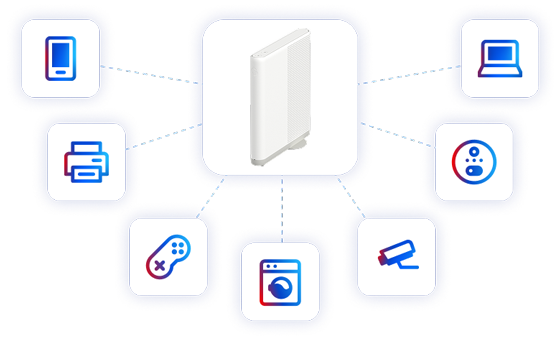
Home network protection works directly on your Swisscom Internet-Box. This means that all devices that you connect to the router via WLAN or cable are automatically protected - immediately and without any installation.
Malware, phishing and other cyber threats are detected and blocked before they reach your devices.
How do I activate home network protection?
As soon as you meet all the requirements, home network protection is automatically activated.
Which devices does home network protection automatically protect at home?
Smartphones, tablets, laptops, Smart Home devices, Smart TVs, game consoles, IOT devices such as printers, webcams, vacuum cleaner robots, lamps and all other devices that are connected to your Internet Box.
Prerequisites
For home network protection to work automatically in your home, these 3 requirements must be met:
- Swisscom Internet subscription
- Internet-Box 3 or newer
- My Security XS, S, M or L
Unblock blocked address
Would you like to visit a blocked address despite the risk? You can unblock a website or IP address within 24 hours. After that, you can only unblock it again if the address is blocked again.
How to unblock blocked addresses
- Go to My Swisscom(opens in new tab) or open the My Swisscom App.
- In My Swisscom, select "Security".
- Select "Detected & averted threats".
- In the list, select the website or IP address that you want to unblock at your own risk.
- Select "Unblock address" and confirm the message.
You can view and remove addresses you have activated at any time in My Swisscom under "Activated addresses" - the page will then be blocked again.
Frequently asked questions
Where can I see which devices are protected?
In My Swisscom(opens in new tab) in the Security Dashboard, you can see all devices that are protected by the home network protection.
Does the home network protection also protect my devices when I leave the house?
No. Your devices are only protected while they are connected to the router at home via Wi-Fi or cable. If you are on the move and the devices are connected to the Internet via mobile or public Wi-Fi, you will need the My Security app on each device.
Can I deactivate home network protection or remove individual devices?
Yes. In My Swisscom(opens in new tab) in the Security Dashboard, you can manually adjust the home network protection or switch it off completely.
A website can no longer be opened - why is that?
With your My Security subscription (from Security XS), Home Network Protection automatically protects you from dangerous websites (e.g. viruses, phishing or fraud).
If a site is blocked, you will see either:
- a Swisscom warning page with a yellow triangle
- a browser error message such as "The website cannot be reached" or "Page not found"
Tip:
Call up another page as a test (e.g. www.swisscom.ch(opens in new tab) or www.google.ch(opens in new tab)). If this works, the affected page has probably been blocked by Home Network Protection.
An app or device no longer works - can this be due to Home Network Protection?
Yes, Home Network Protection protects your entire home network - on all devices (smartphone, tablet, PC, Mac, etc.). Apps, Smart Home devices, cloud services or background processes can also be blocked - without a visible error message. The service then does not work or only works to a limited extent.
My streaming or IPTV service is not working - can this be due to home network protection?
Yes, this is possible. Home network protection blocks connections where sensitive data such as login and password are transmitted unencrypted. Some streaming and IPTV services use such insecure connections to log in - Home Network Protection blocks this for your protection.
How to check and activate the address:
Open My Swisscom(opens in new tab) > Security > Home network protection > Detected & averted threats. Filter for the affected device and search for the message "Unencrypted password", for example. Filter for the affected device and search for the message "Unencrypted password", for example. If necessary, you can unlock the affected website or IP address at your own risk by selecting "Unlock address" and confirming the message.
How to check it:
Open My Swisscom(opens in new tab) > Security > Home network protection > Detected & averted threats. Filter for the affected device and search for the message "Unencrypted password", for example.
I use an ad blocker solution on my Internet Box (PI Hole, AdGuard), is it compatible with Home Network Protection?
Yes, it is, but you may need to change your settings in the Internet Box:
- Go to the router portal- Select "Expert mode on"
- Under "DNS server mode", select the "Automatic" option
- Activate the checkbox "DNS servers advertised via DHCP option 6" and enter the IPv4 addresses of your devices for the ad blocker solution.
- Check the box "IPv6 DNS servers advertised by DHCPv6" and enter the IPv6 addresses of your ad blockers.
- Click on "Save" at the bottom of the page
I use the guest WLAN on my Internet Box. Are all devices connected via this guest WLAN also protected?
Yes, they are just as protected as if they were connected to their private WLAN.
Am I protected by the home network protection when using a VPN?
No. VPN connections cannot be checked by Home Network Protection:
VPN on your device (private or professional): The data traffic is fully encrypted and cannot be viewed by Home Network Protection.
VPN function of the Internet Box: Data traffic is also currently not checked. An improvement is being planned.
Why do I need an Internet-Box 3 or newer?
The computing power of older router generations is not powerful enough to run the additional security software that runs directly in the router.
Choose your support option
Möchten Sie etwas bestellen? Wir beraten Sie

Manage your products, services and data directly in your account.
Open My Swisscom(opens a new window)
The digital assistant Sam helps you with questions about your Swisscom products.
Start ChatGet personal help from experienced Swisscom customers.
Go to help



