Set up and use
Instructions (PDF)
Get to know the device
Buttons and connections
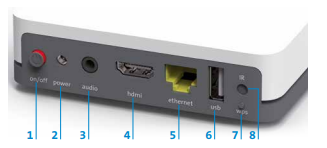
- on/off: switch the device on and of
- power: connect power (power adapter)
(WPS/DECT) - audio: Connect Audio equipment Digital: Home-cinema system (mini TOSLINK cable) Analogue: Hi-fi equipment or amplifier (3.5 mm cinch cable)
- hdmi: connect TV set (HDMI cable)
- ethernet: connect Internet-Box (Ethernet cable)
- usb: USB port
- wps: connect the Swisscom Box wirelessly to the Internet-Box or restart pairing with the remote control
- IR: port for IR receiver
LED behaviour
LED lights up white: the TV-Box is switched on.
LED lights up red: the TV-Box is on standby, or has no Internet connection
LED does not light up: the TV-Box is switched of
Frequently asked questions
Which Internet router can I use with the TV-Box?
The TV-Boxes can be connected with all Swisscom routers. With one restriction: the Voice Assistant cannot be used with the Centro Business router.
Can I combine more than one TV-Box?
Yes, each household can use up to 5 TV-Boxes. You can use any TV-Boxes. However, please note the device restrictions.
Can I also use blue TV without a TV-Box?
Yes, you can also use Blue-TV without a Swisscom TV-Box. Find out more about using blue TV in the browser, via the app or with a third-party provider.
Do I have to return my old TV-Box?
The TV-Box belongs to you and you are under no obligation to return it to Swisscom. However, if you no longer need the TV-Box, Swisscom can refurbish it and give it to another customer as a replacement device.
How much power does the TV-Box consume? How do I save electricity?
Discover the electrical energy consumption of your WLAN-Box 2 here:
Check out these tips and discover how to save energy:
Choose your support option
Möchten Sie etwas bestellen? Wir beraten Sie

Manage your products, services and data directly in your account.
Open My Swisscom(opens a new window)
The digital assistant Sam helps you with questions about your Swisscom products.
Start ChatGet personal help from experienced Swisscom customers.
Go to help